
1. Language:
- Support multi-language (Vietnamese, English, Japanese, Korean, Chinese...) from input data to the reporting system printed out from the software.
2. Dashboard: The dashboard provides hot alerts on current day for each Department, for example:
- Booking until the date of stopping, the date of decision…
- Room Status
- Room capacity chart
- Guest 's birthday
- Room Availability Report
3. Suitable for the Hotel chain management model
- Bravo software allows to manage the hotel/ resort chain model in the form of basic units on the same software
- The Bravo software has an open and flexible design, making it very easy to expand the scope of management, design new features on the built-in software system when necessary according to the development and expansion of the Business
4. Decentralize permissions for each user, for each department, track each user 's actions on the Software through the usage log
5. Multi-dimensional data filtering function, allowing to filter one or more criteria:
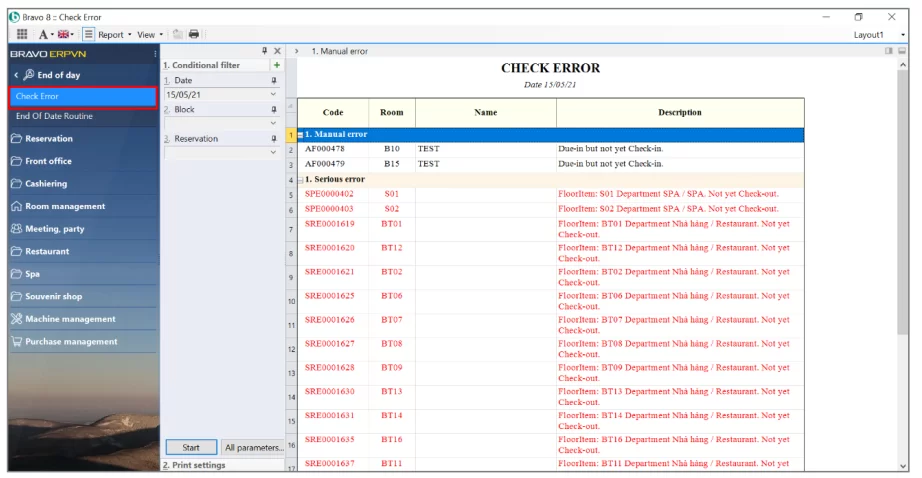
6. Function to check for errors before performing the last operation of day:
- Do not update the price on booking
- The actual number of guests is different from the booking information.
- Notice of due-in bookings but no check-in
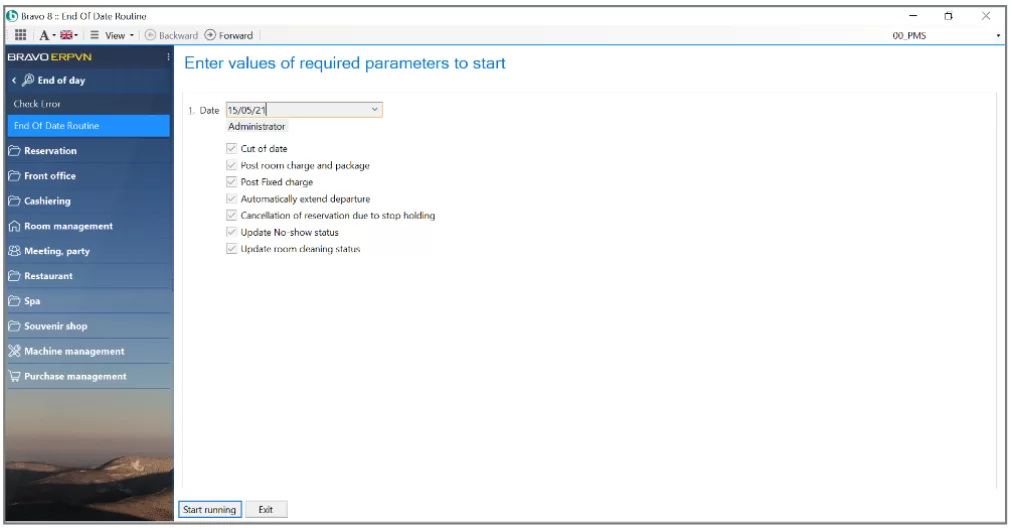
7. Intelligent “Night Audit” function
- Checking errors of available bookings, supporting to fix errors immediately
- Checking rate for each booking
- Change the status of the booking to the date of discontinuation, due-in…
- Changing cleaning room status
- Posting the fixed costs, accomodation charges to rooms
- Cutting-off bussiness day and transfering to new bussiness day
- Night lock/ transaction lock function: The purpose is to prevent other departments from transferring the bill to the room when the Front desk has closed sales with customers
8. Support to quick access to reports
- At the same time, it is possible to reverse query the information contained in the report to promptly handle instability issues. Support additional customization of reports according to the Hotel 's own form
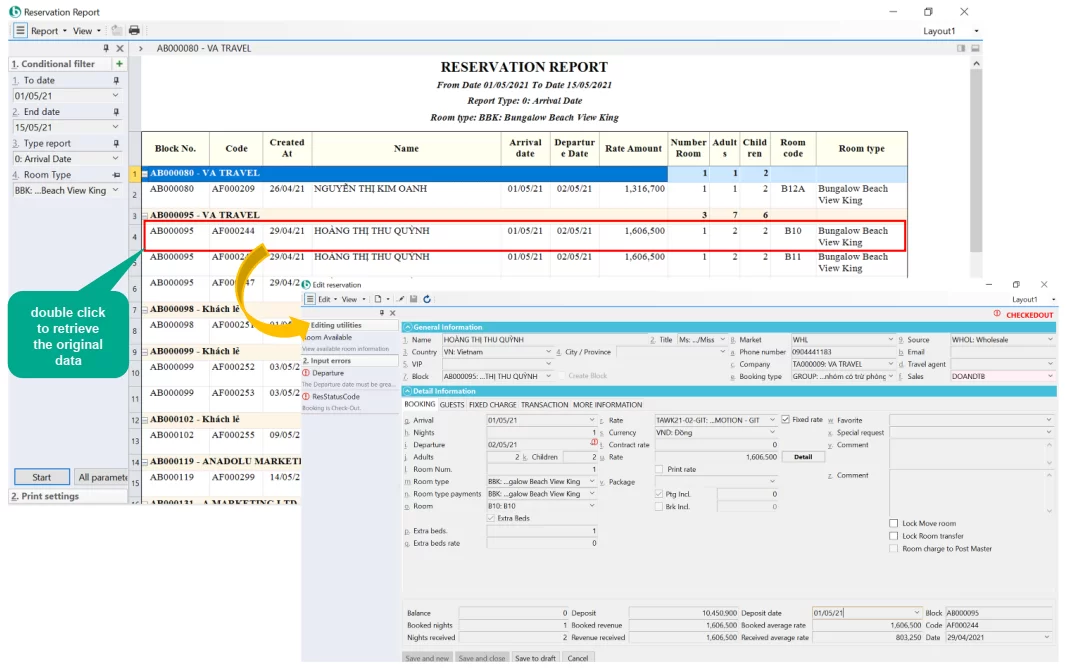
9. Interface – Reservations
- The operation of adding a new booking, check-in, OO/OS room declaration, bill update, etc. is done right on the room map interface.
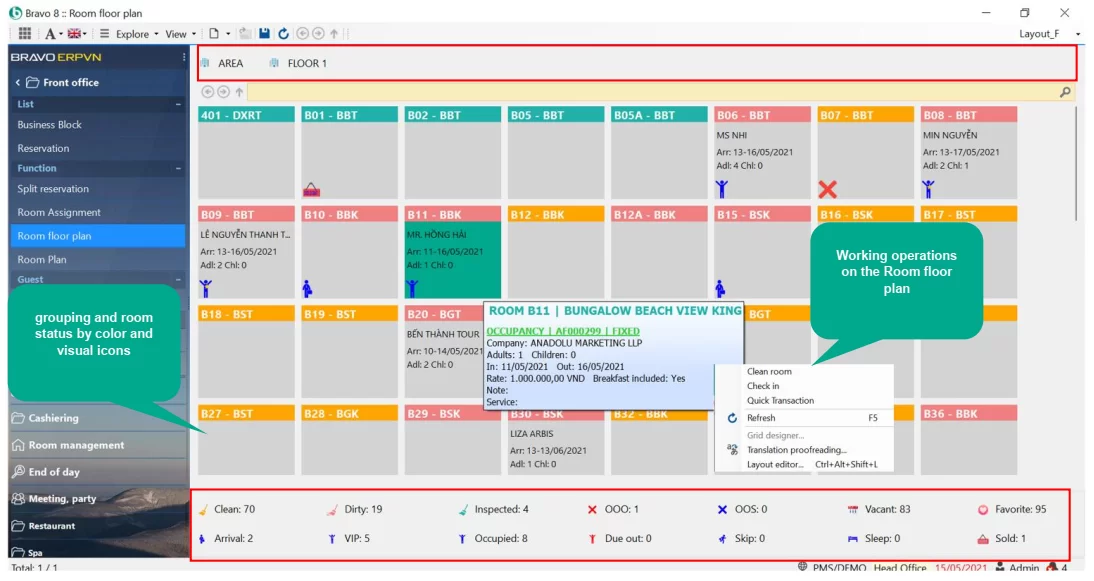
- Quick booking input interface, input binding, support for many input tools such as creating data by room type, recording service packages, deposit …
- Group booking by status, color to identify in the booking display screen.
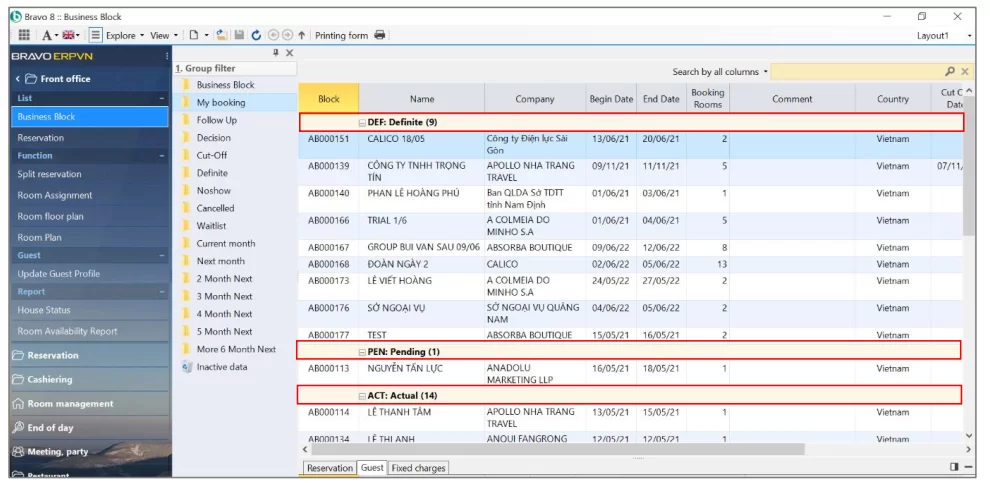
- Check in batch, support import customer profile data by Excel file.
10. Strictly inventory management (automatically exporting Minibar HK, Exporting according to the norms of the restaurant, kitchen, ...)
11. Update arising transactions, print service list, issue sales invoice for each booking. Support issuing electronic invoices
12. The user cannot delete data on software, but only allows suspension to monitor the data. Record the reason for cancellation of booking, suspension of transactions
13. Integrate many peripheral devices such as telephone switchboards, timekeepers, magnetic keys, passport scanners,...
14. IP TV Connection (Through API)
- Bravo push the data:
- Welcome greetings
- Happy Birthday
- Show used transaction information
- Order food
- …..
15. Integrate and connect with many device systems and solutions via built-in APIs (Booking engine, Channel manager, Website)
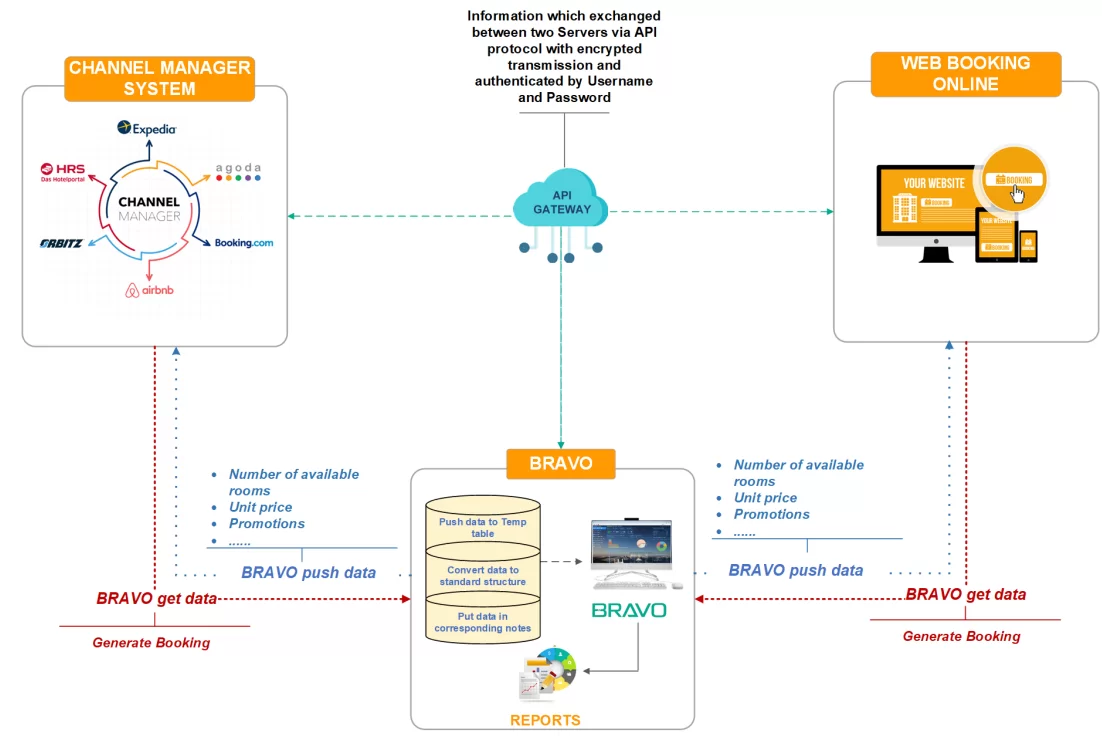
- Two-way synchronization from Bravo software with room sales channels in terms of Price, Number of rooms, ….Fast operation, saving time, minimizing errors for users when there is no need to log in to each channel of OTA to update availability.
- Maximize room capacity when connecting over 150 distribution channels (Booking.com, Agoda, Traveloka, Expedia, Ctrips, Hotelbeds, Airbnb….), increasing presence and connection with target customers.
- Instantly updated information about the availability of rooms when there is a change and receive notifications when there is a reservation, automatically close the room when the number of available rooms is sold out to avoid overbooking.
- Update price policy, booking conditions, and support to create special offers from time to time on room sales channels, creating flexibility and proactively increasing room sales opportunities for hotels.
- Statistics on the connection channels with the highest number of bookings of the hotel, the channels that bring in the most revenue, the 10 channels with the most bookings in the whole system... Supports the hotel have policies and give appropriate orientation appropriate to maximize revenue.
16. Open system, users can self-declare some parameters:
- Overbooking yes or no, current number of sales rooms, number of extrabeds…
- Safety, security, stability
17. Bravo App
- Monitor and update parameters reflecting the overall situation of the Hotel by time: Yesterday, Today, Tomorrow.
- Support the Board of Directors view reports, hotel operations, business results, approve documents anytime, anywhere right on iOS or Android App
- Revenue report by market
- Revenue report by customer source
- Revenue report by type of party booking
- General debt book
- Room availability by month
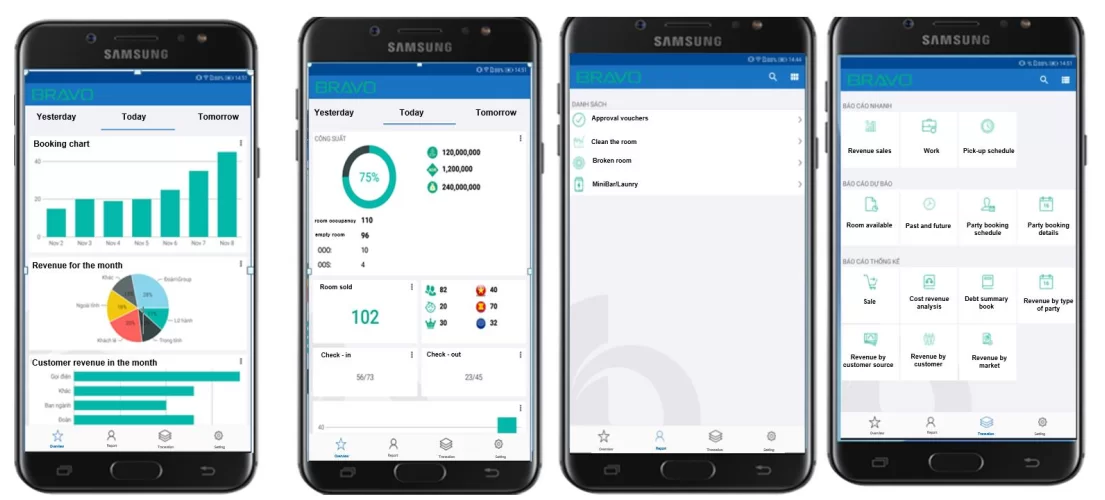
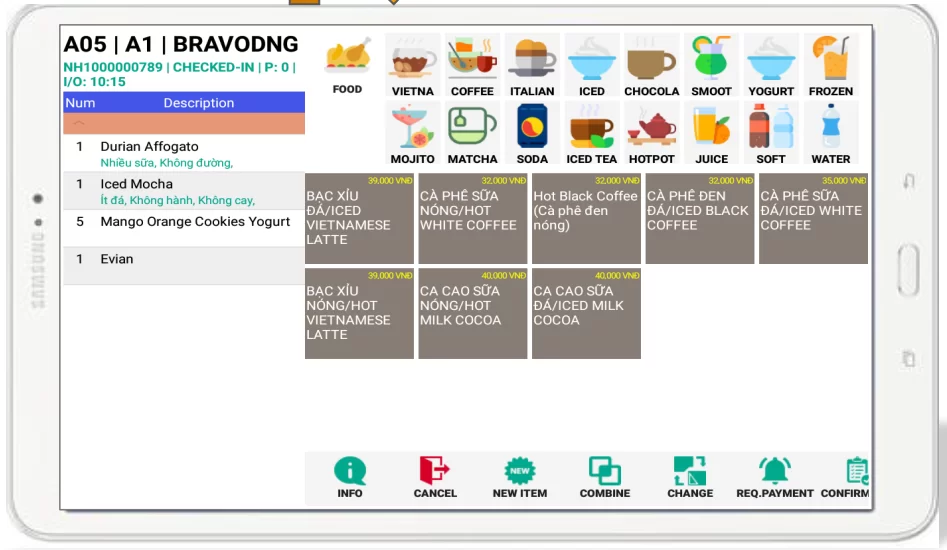
- Bravo App for the Restaurant department
1. INVESTORS
Increasing profits, optimizing profit management system; Analyze and compare with competitors; Control forecast future usage. Reports System:
- Total Statistics
- Room status
- Room usage chart
- Sales report
- Report on production and business results
- Plan and execute revenue/ expenses
- Cash/ Deposit reports
- Report on loan principal/ interest payment schedule
- …..
2. GENERAL MANAGER
Monitor and control hotel operations; business results. Reports System:
- Room status
- General statistics hotel situation statistics for the current day, expected for the next day, for the next month, …
- Daily/ cumulative statistics chart
- Revenue chart by country, company, employee, ….
- Past and future reports
- Reservation forecast
- Revenue/expense reports for each department
- …
3. SALES DEPARTMENT
Receiving bookings, tracking reservations, confirm with the customer. Get the services of booking conferences, weddings and related services…
- Update and store customer information and classify customers by group. The information is stored in a complete and detailed way for convenience in the process of information extraction and customer care later (preferential regime, gratitude and congratulations on holidays, ...).
- Provide available room information at any time, support flexible and fast resolution for customer request , promote sales opportunities.
- Track group bookings, groups including many bookings by “Business block” easily, saving time.
- Price code is built to manage the unit 's price, declared and applied in detail for each room type, by company, for each period.
- Right at the time of booking, you can record information about the number of rooms with children, the number of rooms with extrabeds charged, and monitor the customer 's breakfast information so that the program automatically calculates the fixed costs for each room.
- Stop-keeping date, tracking date, decision date when entering booking information to facilitate tracking and re-verifying information with customers on time for uncertain bookings. The software displays warnings about these bookings right on the system status report.
- Track deposit information for each booking.
- Manage cancellation of reservation, restore reservation. Record the information of the last person who edited the booking, the reason for the correction, the reason for canceling or restoring the booking.
- Connect the software to OTA system (01 main unit – OTA Master)
Supporting reports: Room plan report; Room availability; Room usage chart; Reservation report.
4. FRONT OFFICE DEPARTMENT
Track bookings from check-in to check-out, update arising transactions, print service list, issue sales invoices and submit revenue to Accounting department.
- Room plan: Display the information of certain booking, uncertain booking, check-in room from working days to the time to view the report
- Based on Room plan to be able to check-in, effectively arrange rooms to increase room utilization
- Perform room division (separate booking): To separate group bookings to single booking
- Virtual room creation function (Dummy room): To automatically transfer payment data of rooms in the same booking code to virtual rooms, convenient for payment
- Room assignment: Can be done right at the booking separation step, showing only assignable matching rooms
- Automatically room assignment based on booking information helps to computerize the working process at the Reception Department, and at the same time overcomes the confusion that causes overlapping check-ins, which easily occurs during crowded periods.
- Perform check-in/ cancel check-in: Can perform multiple rooms simultaneously (sweep block with mouse)
- Updating guest information: The software supports importing existing Excel files into the guest management system, pushing guest information to be declared to PA18 software.
- The software is capable of integrating with existing telecommunications networks on the market, allowing users to set up a tariff list for each telephone area code, domestic/international calling charges, and charges of mobile carriers. After automatically charging the outgoing caller, the system will transfer the bill to the folio of each room without the user having to perform any further operations.
- Error checking function before performing end-of-day operations:
- Do not enter the price in booking
- The actual number of guests is different from the booking information.
- Notify due-in bookings but not check-in
- Night Audit function: Automatically perform end-of-day transactions:
- Checking errors of available bookings, supporting to fix errors immediately
- Checking rate for each booking
- Change the status of the booking to the date of discontinuation, due-in…
- Changing cleaning room status
- Posting the fixed costs, accomodation charges to rooms
- Cutting-off bussiness day and transfering to new bussiness day
- Night lock/ transaction lock function: The purpose is to prevent other departments from transferring the bill to the room when the Front desk has closed sales with customers
5. CASHIER DEPARTMENT
Tracking service information that customers use during their stay time has been automatically transferred to each folio corresponding to each room, as a basis for service lists, receipts and sales invoices when performed check-out for guests.
- Function to transfer/ merge/ split bill with same block or different block to assist in making service list according to the needs of guests.
- Sales invoice: issue invoices for transactions arising at FO, POS.
- Cash receipt: let the cashier collect the customer 's debt and pay cash to the Accounting department.
- Perform check-out for customer after the customer completes the payment process.
- Monitor Money exchange
- Record the amount of foreign money collected and the amount of VND exchanged for guests. The data will be transferred to Accountant Department for performing account
- The accounting department links sales invoice data, receipts for performing account, and reports on accounting books.
6. HOUSEKEEPING DEPARTMENT
Cleaning room, updating minibar, laundry arising transactions; Check room deviation, monitor cleaning schedule.
- Room map: monitor hygiene status, guest stay time, guest prepare to check in, room in sleep/ skip state
- At the room map interface, you can change rooms, update hygiene status, update room arising transactions, print laundry bills, mini bar transactions... => Support manipulation on Smart devices by Bravo Apps (installed on Android/ iOS operating systems)
- Check-in lounge update feature – the connection between the Reception and the Housekeeping
- Room cleaning status report showing the number of clean/dirty rooms.
- Update room cleaning status according to filter conditions, done at the same time for many rooms by simple operations (using mouse, using keyboard shortcuts).
- Support automatically job assignment
- The interface for updating minibar service, laundry service is displayed with service list information and unit price, supporting users to update data quickly and easily.
- Inaccuracies in guest information, service packages used by each room will be automatically displayed when the night audit checks for errors before running the night for each booking.
- Monitor and update unusable rooms (OOO), converted rooms (OS). The interface “Broken room” allows declaring a list of broken rooms. Previously had to add each new room in “Broken rooms, rooms not for rent”.
- Monitor and update broken and lost supplies in each room.
- Repair request form - connection method between the Housekeeping and the Technical
- Reporting system: General report on arising rooms; Detailed report on arising of rooms
7. FOOD & BEVERAGE (F&B)
Serving breakfast, organizing parties, conferences, alacarte,…; Collect money and issue invoices to customers; Report daily sales and submit revenue to Accounting Department.
- Set up a list of computers (restaurant outlets), employees. Declare decentralization to control employee operations (not allowing to modify prices/ modify sold transactions, .... to avoid fraud at work)
- Make and print Shift opening note (counters), money delivery minutes. Has the feature to automatically open a trading session
- Reservation support and use service for guests requesting directly or guests requesting through other departments such as reception, sales... Record booking information: customer name, table of use, arrival date, departure date, food/drink/service use…
- Features to support party/ meeting booking
- Monitor the table map on the software
- Look up information about the retail price list quickly and promptly.
- Manage the quantity of goods by each warehouse, POS; Move goods between warehouses.
- Support to merge bill, split bill, transfer payment bill into room, other department
- Support manipulator tools at Kitchen/ Dispensing Counter
- Based on the declared Menu and Table Map, the waiters make the order directly on the POS machine or on the handheld device.
- Manage the norms of each food and drink; automatically generate Warehouse delivery notes according to norms
- Make and print retail bill transactions (self-calculating goods at retail prices, taking discounts…. Recording customer payments and returning excess money to customers).
- Set up and manage retail policies: discounts, promotion,...
- Payment in many methods (Cash, Bank Card, Debt, Transfer to room ...)
- Make and print a list of currencies to be paid when closing shifts
- Plan and organize menus. Updating and tracking material norms. Inventory tracking. Report and transfer expenses to the Accountant department….
- Automatically push retail bill to Warehouse delivery notes to manage inventory, support inventory reports
- Breakfast management:
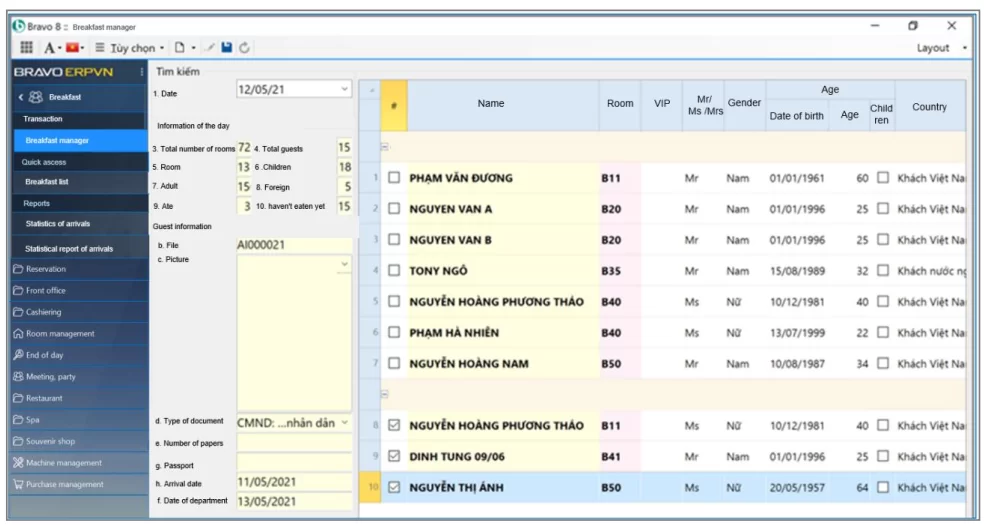
- Reporting templates: Sales revenue report by employee; Daily sales revenue; Sales report by item; Daily payment report; …
8. SPA
Serving customers with Spa related services, collecting money and issuing invoices to guests, reporting daily revenue and submitting revenue to the Accountant department.
- Set up a list of computers (Spa outlets), employees. Declare decentralization to control employee operations (not allowing to modify prices/ modify sold transactions, .... to avoid fraud at work)
- Make and print Shift opening note (counters), money delivery minutes. Has the feature to automatically open a trading session
- Reservation support and use service for guests requesting directly or guests requesting through other departments such as reception, sales... Record booking information: customer name, service of use, arrival date, departure date, …
- Monitor Spa room plan on software
- Look up information about retail price list quickly and timely.
- Update customer service information
- Support to merge bill, split bill, transfer payment bill into room, other department
- Manage the norms of each service; automatically generate Warehouse delivery notes according to norms
- Make and print retail bill transactions (self-calculating goods at retail prices, taking discounts…. Recording customer payments and returning excess money to customers).
- Set up and manage retail policies: discounts, promotion,...
- Payment in many methods (Cash, Bank Card, Debt, Transfer to room ...)
- Make and print a list of currencies to be paid when closing shifts
- Updating and tracking material norms. Inventory tracking. Report and transfer expenses to the Accountant department….
- Automatically push retail bill to Warehouse delivery notes to manage inventory, support inventory reports
- Reports Form
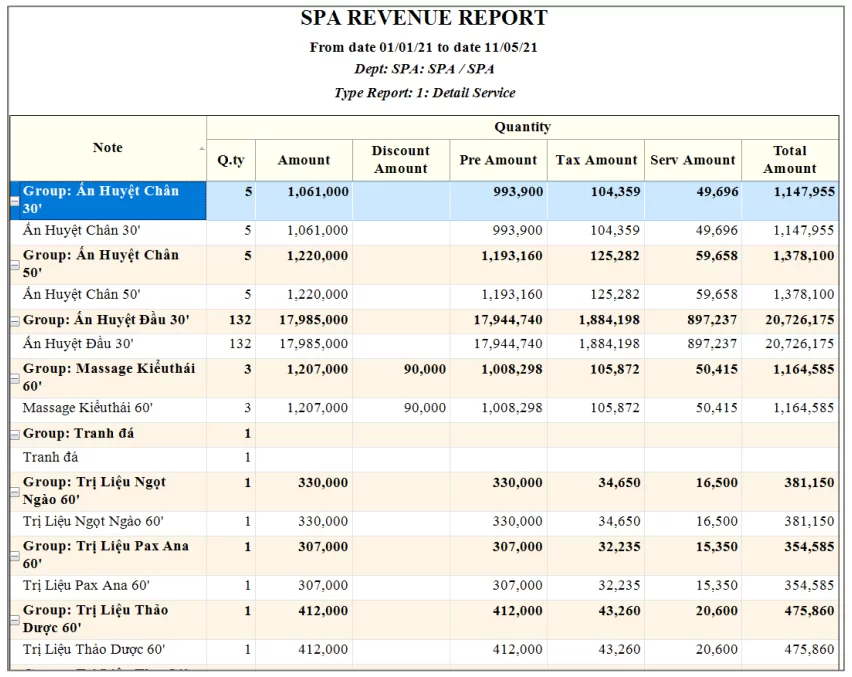
9. PURCHASING DEPARTMENT
Manage the purchase with many different criteria and track the payables of each object, contract, order... Create a purchase plan, pay all debts fully to the supplier, on time and accurate
- Supplier information management
- Building a supplier system in many levels
- Follow up the purchase plan
- Follow up the purchase process
- Based on the “Purchase Plan” and the current needs of material of each department, the departments will prepare a “Purchase Require (PR)”:
- Update Supplier Quotation
- The software supports Supplier Price Comparison Table. The User makes the decision to choose a supplier
- Update Purchase Orders/Contracts
- Reporting system: Report purchase orders by delivery time; Purchase order tracking book; Detailed report on purchase contract by item; …
10. HUMAN RESOURCES - TIMEKEEPING - SALARY DEPARTMENT
Helping businesses save time, costs and manage personal information clearly and specifically. At the same time, the system supports administrators to properly monitor and evaluate the actual capacity of personnel. Assist with human resource management tasks such as recruitment, training, employee records, detailed tracking of personnel information, personnel evaluation. Monitor and calculate details of salary, bonus, income tax and fluctuations, thereby giving a complete picture of the human resource situation and labor quality in the Enterprise
Recruitment
- Serving the job Recruiting personnel and evaluating the effectiveness of recruitment times
- Create an archive of candidate records for future recruitments
- Statistical report, analysis of recruitment situation (number of candidates participating in interviews/exams, number of candidates... according to recruitment plan, according to vacancies...).
Human Resource Management
- Manage information of employees from the time they start working at the company
- Monitor changes and fluctuations of each employee during the working process
- Provide an overview of the company's personnel situation
- Personnel monitoring reports such as: Analysis and summary reports of personnel (by branch, department, gender, age, ...)
- Personnel reports and warnings such as: Report employees with birthdays in the month, Reports on labor contracts that are about to expire in the period...
Training Management
- Follow up the training plan for new employees, employees who have worked at the company to improve professional quality
- Record training results, evaluate personnel quality
- Warning of constraints related to training costs when handling leave cases (if any)
- Training statistics report (Number of employees participating in training according to training plans, training courses; Number of employees who failed the post-training test...).
Employee Evaluation Management
- Monitor of the targets that need to be achieved by each position and title
- Evaluate personnel according to the evaluation criteria of the enterprise that established on the software
- The basis for proposing rewards and punishments for employees
- Record assessment results and store them according to each employee 's profile
- Report on evaluation, employee classification, report on reward and punishment proposal,...
Social Insurance Tracking Management
- Monitor the list of employees participating in social insurance, the process of increasing and decreasing, adjusting information
- Monitor the list of employees in sickness and maternity regimes
- Provide all forms and reports according to the State 's regulations on social insurance.
Uniform, Tools Management
- Estimate Budget need to be prepared for purchasing uniforms
- Monitor the process of issuing and withdrawing uniforms
- Uniforms Inventory tracking report
Timekeeping Management
- Accurately record employees 's time attendance, properly handle cases of late arrival, early departure, overtime, leave, .... to avoid controversy in the Enterprise.
- Limiting editing time attendance interventions, ensuring fairness
- Create month-end payroll quickly
- Report on management of working days, coming late, leaving early, overtime; Leave management report; Warning over overtime, overtime leave,...
- Support time attendance, leave application, personnel information management on the App platform
Salary Management
- Connecting timekeeping data to calculate salary for employees
- Support many salary calculation options to meet the Units with many departments, many different ways of calculating salary
- Quickly and accurately month-end salary calculation
- Monitor salary fluctuations of each employee, each department time by time
- Reports: Salary sheet, Salary advance sheet, Income sheet (transferring via bank), Personal income tax detail sheet, Personal income tax declaration, Taxable income statement,...
11. FINANCIAL - ACCOUNTANT DEPARTMENT (VAS)
Connecting original data with other modules. Update and develop plans of financial, revenue and expense management. Gather data to make financial statements, tax reports, reports submitted to superiors and management reports
- Monitor revenue and expense plans
- Cash accounting
- Manage cash receipts/ expenditures/ cash balances and bank deposits in each currency (VND, USD, EUR…) by making and printing Cash Receipts/ Cash Payments/ Credit Notes/ Debit Notes directly from the Software.
- Process and track revenue/ expenditure/ advance by object, invoice, contract.
- Monitoring credit limit, loan contract.
- Purchase Accounting – Payable
- Purchasing/ import receipt (concurrently warehouse receipt)
- Purchasing expenses note
- Cash Payments/ Debit note
- Notes: Print Debit note according to the form of many banks directly from the software. Directly approve documents by many status (pending approved/ pending completed/ locked/ cancelled)
- Sales Accounting – Receivable
- Sales invoice (concurrently warehouse delivery)
- Cash Receipts/ Credit Notes
- Notes: Print invoices directly from the software. Directly approve documents by many status (pending approved/ pending completed/ locked/ cancelled).

